




Digitard
Members
-
Joined
-
Last visited
Everything posted by Digitard
-
Update: On Sunday afternoon (~2pm EDT), another update was available and installed. After this update, I've noticed that this bug appears to now be addressed. Since the patch, I've completed 4 in-game days of fishing with multiple fish on multiple rods and not encountered this issue once. I haven't had a chance to review the patch notes or source feedback from Fishing Planet to confirm. Can anyone else verify my observations?
-
Despite an update going out on Sept. 2nd, I can confirm (unfortunately) that this bug is still an issue. Hoping the next update actually patches this.
-
@Musete - I think you might be onto something here. That theory is a plausible one as when I think about my scenarios, I believe it fits that description. Just because I didn't have a secondary fight on, doesn't mean the fish wasn't at the bobber getting hooked for example. Did you notice this issue prior to the recent patch?Another example at Emerald Lake. Confirmed with Walleye as well. Using the same multi-rod stand (3 rods) although in this case, I had multiple fish on the line and was swapping between rods. As you can see, plenty of capacity left in my Keeper and the weight is well within limits. Had no choice but to release it.
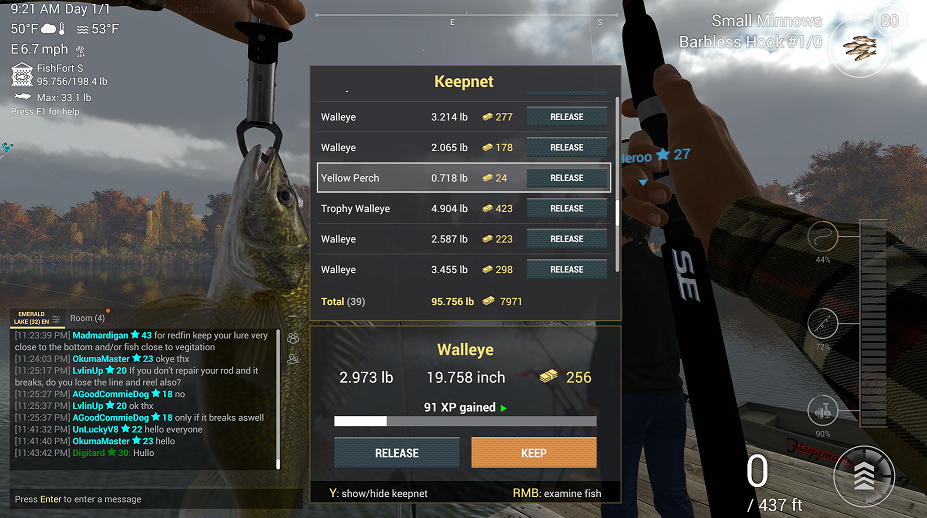 @Musete - not sure it's exactly the same. Yes, I'm also using a multi rod stand (3 rods), but when this happens, it usually isn't when I have multiple fish on the line. All of my other 3 floaters are awaiting a bite and my casting rod is the only one pulling in the fish and it happens. Guess what? It just happened AGAIN! @fishingplanet - FIX THIS!
 Username = Digitard Platform (PS4, Steam) = Steam Date when the issue was encountered = August 29, 30 Problem description = See subject In-game equipment settings (if you experience any technical issues with rods, lures etc) = Setup #1 - Brutus 10'10"SE rod, Hornet Swarm 5000 SE reel, Small Minnows, #1 Barbless Hook, Fluoro .012 line, Chubby floater. Setup #2 - FarCaster 8'6" rod, Helios 3000 S reel, Fluoro .012 line, Trophy Casting Spoon 3/4 oz, #3/0. Setup #3 = Nero 14'10" rod, Breamer 4000 reel, Fluro .012 line, Chubb floater, Titanium leader, #1 Barbless hook, Small minnows. Hi, In the past 48 hours, upon upgrading my feeder to the FishFort S (198.4lb capacity), I've noticed an odd bug present itself. Note: I'm not saying the upgrade to the new feeder is the reason. Also, a recent patch was rolled out so that's also worth noting. Randomly, upon successfully reeling in a fish, it presents both options (Release, Keep) and when I try to click Keep, nothing happens. I've verified: 1.) I have enough capacity in my keeper 2.) The fish weight is supported by my keeper 3.) That the game is the active window on my Operating System 4.) I don't have chat highlighted with a blinking cursor to type. I've also tried: 1.) Toggling opening my Keeper and coming back 2.) Scrolling left and right between Release and Keep 3.) Hitting 'P' to go into photo mode, then back 4.) Alt + ` to toggle off HUD and back on. No matter what, I have no choice but to Release the fish (of course that works) and then I get the "Please Wait" with the revolving dotted circle prompt for a second before I can proceed to cast. This has occurred with: Flathead Catfish, Bass, Crappie, Florida Gar of Common and Trophy quality (attached screenshot is an example) This has occurred at: Neherrin Lake, Everglades Please look into this.
 @jimkaf - That was it. Thanks for your help!Hi, For over a day now, I've noticed that the retrieval technique that normally shows up when you're reeling in your lure no longer displays. It's hard to determine my speed now or whether my technique is even registering because I'm effectively blind. The rest of my HUD is currently displayed and works just fine. I've tried changing my Video settings by reducing Ultra to Beautiful or Fantastic, but this hasn't resolved it. Restarting the game has not resolved it. Toggling my HUD using the ` key does not resolve it either. Username = Digitard Platform = Steam Date when the issue was encountered = August 26 Problem description = See subject In-game equipment settings = Please specify. Any help would be appreciated.

