



Skip to content
View in the app

A better way to browse. Learn more.

Fishing Planet Forum

A full-screen app on your home screen with push notifications, badges and more.

To install this app on iOS and iPadOS
  1. Tap the Share icon in Safari
  2. Scroll the menu and tap Add to Home Screen.
  3. Tap Add in the top-right corner.
To install this app on Android
  1. Tap the 3-dot menu (⋮) in the top-right corner of the browser.
  2. Tap Add to Home screen or Install app.
  3. Confirm by tapping Install.

Senior_Chief

Members
  • Joined

  • Last visited

  1. We all have our bad days on the water. Mine run into days sometimes.
  2. Here as well a couple of times. Figured it was my router or ISP and the issue was brief so I didn't pay much attention to it.
  3. Great addition to the game experience guys! It would be nice if we could turn the "CAP" light On/Off. We don't want to scare the big monsters off and attract hordes of mosquitos.
  4. Great & informative post. Thank you!
  5. I'd like to see the ability of turning the light on the 'Cap" On/Off. Call me superstitious, but it might scare off the fish in the immediate area if it's on. A nice personal touch for the experience.
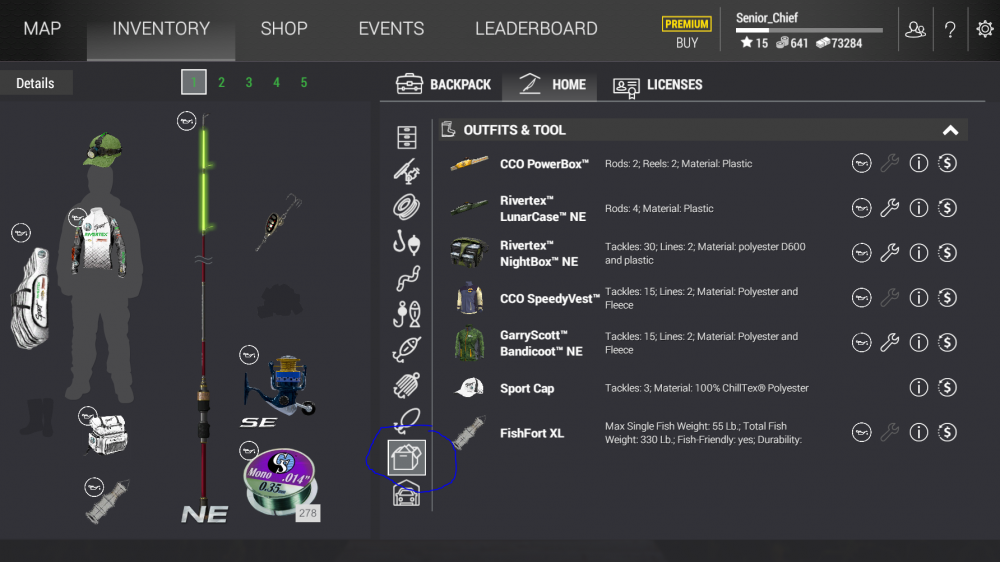
  6. If I'm not mistaken, the Cap appears in the circled area shown when the achievement is fulfilled.
Account

Navigation

Search

Search

Configure browser push notifications

Chrome (Android)
  1. Tap the lock icon next to the address bar.
  2. Tap Permissions → Notifications.
  3. Adjust your preference.
Chrome (Desktop)
  1. Click the padlock icon in the address bar.
  2. Select Site settings.
  3. Find Notifications and adjust your preference.